Qwen 3.8 27B 评测:默认过度思考,但本地运行能力出色
评分
79提供大量一手测试细节和独特发现,信息增量高。
内容详实,包含具体示例、数据和对比,质量高。
给出明确的调优建议,对本地用户很有操作指导意义。
针对刚刚发布的模型进行即时效评测,时效性强。
Simon Willison 是业内知名技术博主,信源可信度高。
基础分 88 × T2 信源权重 ×0.9 = 79
精选线 70已入选精选
精选理由
该评测基于一手实测,包含具体数据与对比,对本地模型用户有直接参考价值。
AI 点评
「这可能是近期最实用的本地模型评测之一。对于想要在笔记本上跑模型的开发者,Qwen 3.8 27B 的默认配置是个坑,Simon 的调优建议能直接帮你省下几十分钟等待。此外,他能让模型自己生成工具的做法也很有启发性。」
速览
Simon Willison 评测阿里 Qwen 3.8 27B:Apache 2.0 许可、27B 参数视觉模型,本地运行表现出色,但默认 xhigh 推理强度导致严重过度思考,连画个圆的 SVG 都要长篇推理。调低思考强度后性能依旧优秀,边界框定位极其精准,还能离线开发定制工具。建议用户务必手动调整默认设置。
- Qwen 3.8 27B 是阿里开源 Apache 2.0 许可的 27B 参数视觉语言模型。
- 默认 xhigh 推理强度导致严重过度思考,生成一个 Pelican SVG 花 21 分钟。
- 调低推理强度后速度大幅提升,且边界框(bounding box)检测非常精准。
- 模型可在本地离线完成复杂工具开发,适合个人电脑。
正文
以下为原文,中文全文翻译生成中
Friday's big release was Qwen 3.8 27B, an Apache 2 licensed 27B parameter vision-capable LLM from Alibaba's Qwen research lab. I've been looking forward to this one: 27B is an excellent size for running a model on a reasonably specced laptop, and its predecessor Qwen 3.6 27B was impressive.
Qwen's self-reported benchmarks for this model are eye-opening. They show a boost from both Qwen 3.6 27B and the closed-weight Qwen 3.7-Plus, which was one of Qwen's strongest models of any size as recently as May this year. It will be interesting to hear what independent benchmarks have to say about the model.
I've been running the model on two different machines: my 128GB M5 Max MacBook Pro, and an NVIDIA DGX Spark. On both machines I'm running LM Studio and their 17GB Q4_K_M quantized build. I also tried using llama-server directly on the Spark.
The default of extra high results in spectacular over-thinking
Qwen's documentation describes the model as defaulting to xhigh for the reasoning effort, and the LM Studio GGUF I've been trying preserves that default:
Qwen3.8 comes with official support for
reasoning_effort, which can be used to adjust reasoning depth and control cost:
xhigh(default): for complex tasks demanding thorough analysismedium: balancing accuracy and speedlow: efficient reasoning optimizing for speed and cost
This is a hilarious default. It's absolutely not a good way to run the model, especially on consumer hardware. I've been finding the results extremely entertaining.
I quickly ran into problems with LM Studio's default context limit of 8,192 tokens - Qwen was using them all up thinking about even the most mundane of problems. I loaded the model with the full 262,144 maximum context length and that problem went away.
Here's the pelican riding a bicycle SVG I got from my first attempt with that increased context length. It took 21 minutes to generate, using 22,276 reasoning tokens to produce 3,223 tokens of output. You can read the reasoning trace here.

This is by far the best pelican SVG I've been able to generate with a model that runs on a local machine - and this Qwen is pretty small, just a 17GB file on disk. There's a lot to like about this:
- The bicycle frame is the right shape
- It has legs on each side of the bike - that's very rare
- Good, clear pelican pouch
- The wings extend to touch the handlebars!
- The motion lines are behind, not in front
- It has a tasteful background - nice sun, clouds, hill, flowers and grass.
Was that worth waiting 21 minutes for? Absolutely not.
Here's that same prompt run with reasoning turned off - transcript here. This one produced 3,715 tokens and took 137s - just over two minutes.
 And just for completeness, I used OpenRouter to run the same prompt through the much larger Qwen 3.8 2.4T-A95B (released last week) and got this snazzy animated SVG:
Your browser does not support HTML5 video.
I said Qwen at xhigh has a tendency to over-think things, but how bad really is it?I tried a much simpler prompt, again with that default extra high setting:
draw an svg of a circle
Qwen's reasoning trace started like this:
The user is asking for an SVG drawing of a circle. Simple request — but I want it to be a carefully crafted piece. Let me make something that goes beyond just
<circle>: a single self-contained SVG file with character — maybe a geometric "circle study," with subtle animation, layered rings, and a distinctive palette.Keep the scope right: they asked for an SVG of a circle. So the core is a circle. But I can add craft: concentric guide circles (like a compass/geometry drawing), tick marks, a soft gradient fill on the main circle, restrained ambient motion (a slowly rotating dashed ring, pulsing glow). Respect prefers-reduced-motion? That's more for CSS; SVG SMIL or CSS inside SVG will do.
Palette options: deep teal ink on warm paper? Or bold vermilion circle on off-white with navy construction lines — Bauhaus/compass-drawing vibe. Let me go with a "geometric study" look: cool slate background, or bright paper white? Paper white is fine if it's not the cream-and-terracotta combo. [...]
Several minutes later it produced this absolutely beautiful animated circle, which was entirely not what I had asked for!
Your browser does not support HTML5 video.
My strong recommendation: ignore that default. Run Qwen 3.8 27B on low or even no reasoning levels at first. It's a great model, but wow that default setting is a bad place to start.It's very good at bounding boxes
A fun way to test a vision model is to see how well it can return bounding boxes around items in a photograph. I've seen previous Qwen models deal well with this, so I decided to put it to the test drawing bounding boxes around some pelicans.
I've seen asking for 0-1000 scale produce good results in the past. I tried this:
llm -a https://static.inaturalist.org/photos/714731804/large.jpg \
  -m lmstudio/qwen/qwen3.8-27b \
  'Return JSON bounding boxes for the pelicans in this photo, 0-1000 scale for each dimension'
Here's the reasoning trace, which produced this:
[
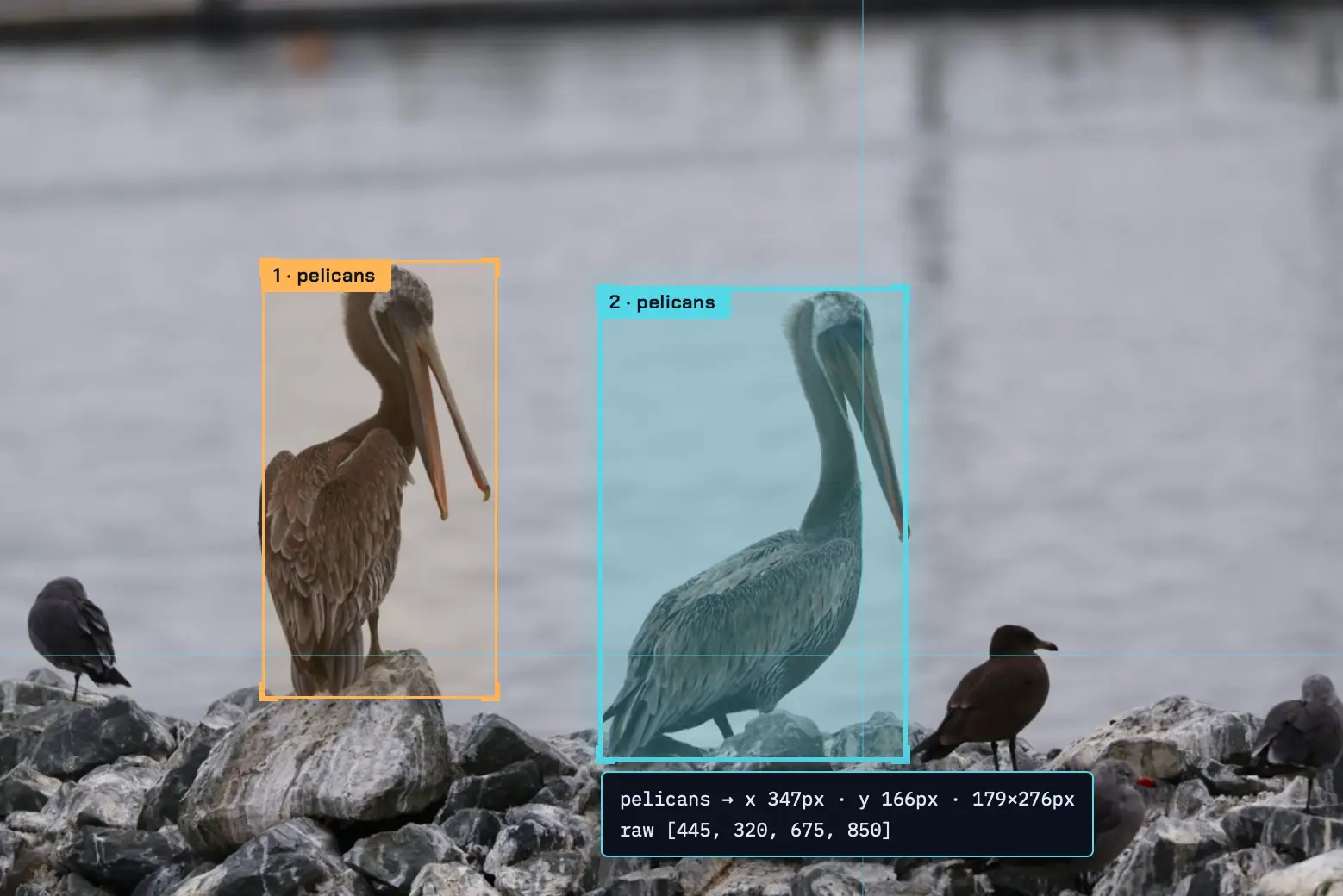
  {"bbox_2d": [195, 290, 370, 780], "label": "pelicans"},
  {"bbox_2d": [445, 320, 675, 850], "label": "pelicans"}
]
This is such a good match. Here are those boxes rendered on top of the photo:
Building a tool to label bounding boxes
That visualization of the bounding boxes was taken using a new custom tool that I had Qwen 3.8 27B build for me, running offline on my laptop.
I forgot to dial down the thinking effort so it was massively over-engineered, but it did manage to produce this full interface from this single prompt:
[
   {"bbox_2d": [195, 290, 370, 780], "label": "pelicans"},
   {"bbox_2d": [445, 320, 675, 850], "label": "pelicans"}
]
Build an HTML page which has an input box for accepting the URL to an image and a textarea for accepting the above style of JSON.
It appends the image to the page, measures its width and height, then treats the coords in the bbox_2d as scaled from 0-1000 and scales them against the actual width and height, then it renders labelled boxes over the image.
This screenshot shows one of the features I did not ask for - a demo scene, for if you don't have a photograph to test the tool with:
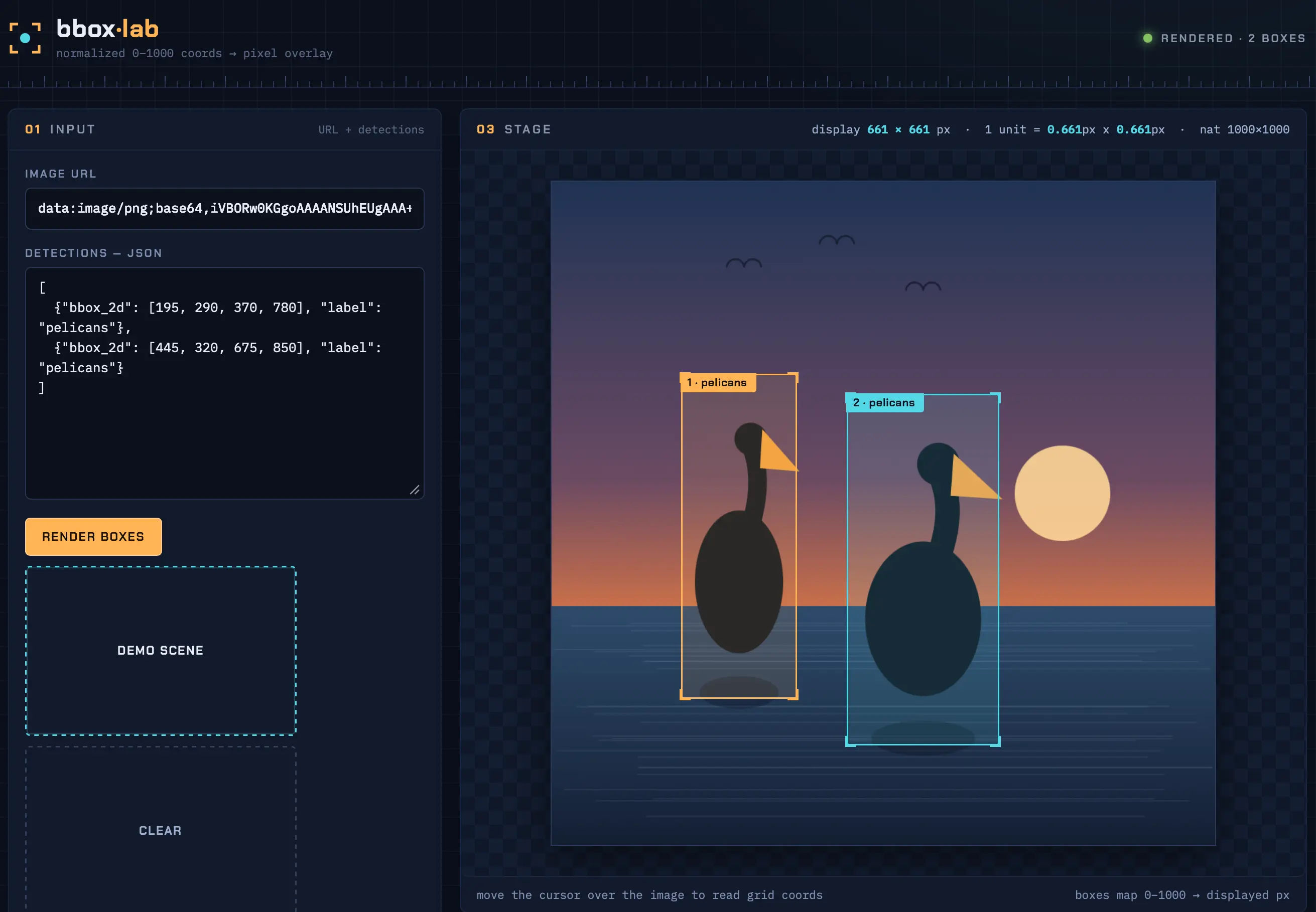
Here's the relevant segment of the thinking trace, where it decided to draw its own pelicans purely because I had used the label "pelicans" in the example JSON I gave it in the prompt:
Also a "load sample" that uses a known image? Can't depend on external images, but… the image URL input is user-provided; I could add a "try with sample" button [...] Hmm, I can draw a simple scene on canvas, export it as a data URL, and load it into the image — that's self-contained and demo-able! [...] But the user's coords are for an actual pelican image; a generated placeholder can still demo the scaling. Generate a 1000x1000 placeholder: gradient water + two blob-like "pelican" silhouettes placed at the given bboxes (using the same scale — cute: silhouettes at the exact 0-1000 positions, showing the boxes align). This makes for a fun, self-contained demo. Keep it simple: sky gradient, sun, water, two pelican-ish shapes (ellipse body, circle head, beak). Place at bbox centers.
(I'm slightly nervous that models around the world might have a bias towards drawing pelicans at any chance they can get, brought on by nearly two years of exposure to my own stupid benchmark.)
Is all that over-thinking necessary? Maybe it is, at least a bit. I tried with reasoning turned off and got this version, (transcript here), which nearly works but shows the boxes in the wrong place:
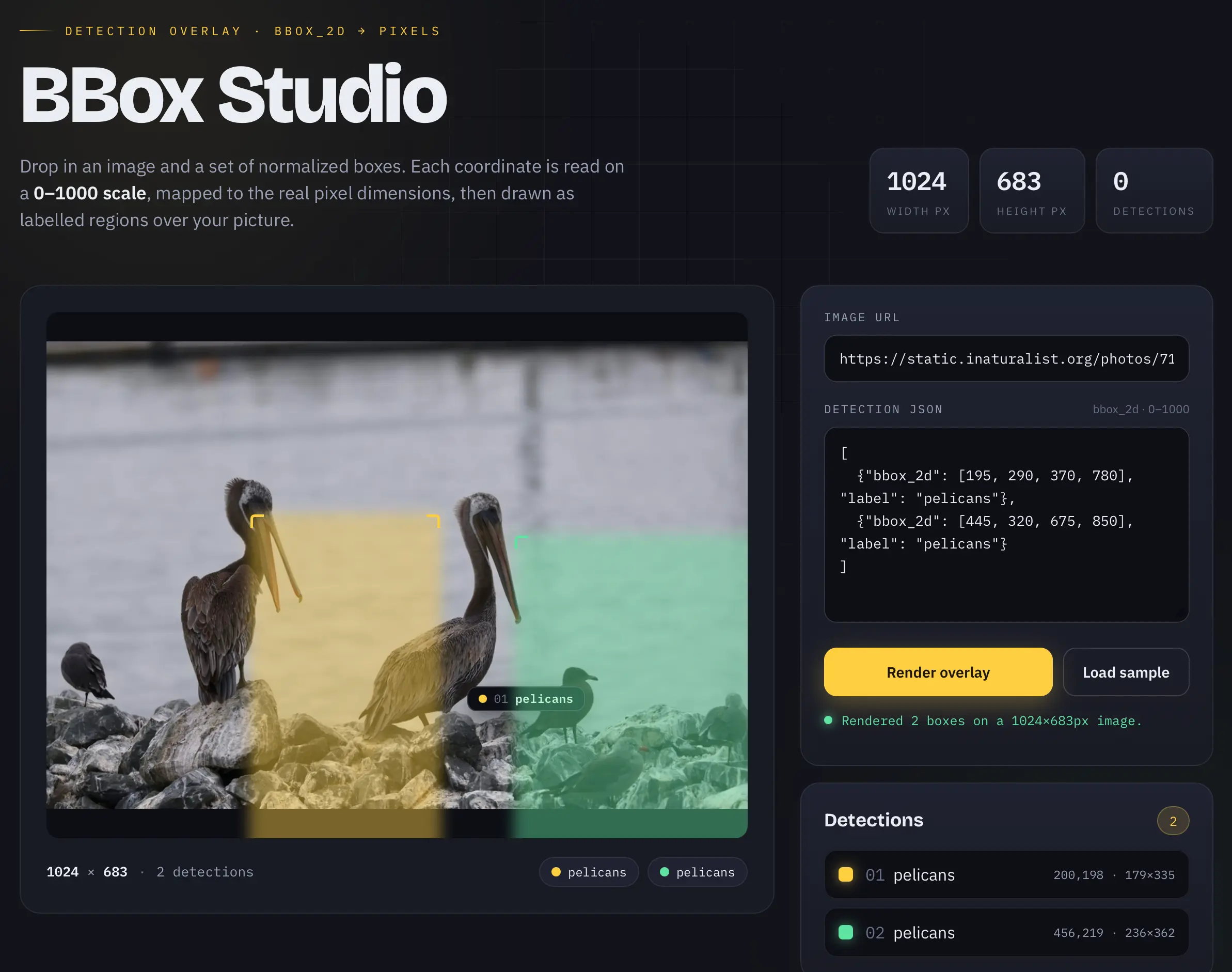
So without reasoning it didn't quite one-shot a working tool. I'm sure it could get there with some follow-up prompts, but this is a good example of how reasoning can make a difference.
Yes, it can drive coding agents
One of the biggest questions around local models is whether or not they have enough horsepower to successfully run a coding agent loop. Coding agents require long context, strong code generation support and reliable tool-calling. On paper Qwen 3.8 27B has all three of these, so is it up to the task?
My initial experiments with Pi have been very promising. I chose Pi because it has a shorter system prompt than most other options, making it a better fit for trying out smaller models.
I configured Pi to use Qwen 3.8 27B running in LM Studio on the Spark (shared via tailscale serve) by adding this to ~/.pi/agent/models.json:
{
  "providers": {
    "spark": {
      "baseUrl": "https://spark-18b3.tail68a31.ts.net/v1",
      "api": "openai-responses",
      "apiKey": "dummy",
      "models": [
        {
          "id": "qwen3.8-27b",
          "reasoning": true
        }
      ]
    }
  }
}
Then ran pi --provider spark --model qwen3.8-27b in my ~/dev/datasette folder and prompted:
how does auth work?
After a sequence of reasoning and tool calls that accessed a bunch of different files it produced this reply, which is very solid.
Just one problem: I wanted to share that transcript. So I pointed Pi and Qwen 3.8 27B at the JSONL transcript file in ~/.pi/agent/sessions/--Users-simon-Dropbox-dev-datasette-- and prompted:
Write Python code to convert this jsonl to markdown
And it built and tested this pi_jsonl_to_md.py, which did exactly what I needed. Here's that session transcript, published using the tool that it created.
The quest for speed
So far this is all looking very promising. We have a 17GB model that runs on high-end consumer hardware and can write code, drive tools, annotate images and generally do everything that I need from an LLM for getting real work done.
There's one very significant catch: it feels slow - especially when it starts over-thinking, but even without that it's not particularly sprightly.
I've been getting around 15-30 tokens a second from LM Studio. That's not terrible, but it's slow enough that it's going to be hard to win me away from hosted API models, which can return results a whole lot faster. Artificial Analysis track token speed and show OpenAI 5.6 Sol at 74 tokens/second and 5.6 Luna at an impressive 184/second.
The good news is that the community have been exploring ways to speed things up since the model was first released two days ago.
One of the most promising optimizations is baked into the model itself. Qwen supports Multi-Token Prediction, an architecture trick where a cheaper mechanism guesses several tokens ahead and the main model can then quickly verify if the guesses were correct. This can have quite a dramatic effect on inference performance.
Based on this tweet from llama.cpp creator Georgi Gerganov I tried running the model with MTP like this on the Spark:
llama serve \
 -hf  ggml-org/Qwen3.8-27B-GGUF:Q4_K_M \
 -hfd ggml-org/Qwen3.8-27B-GGUF:Q4_0 \
 --spec-default \
 --spec-type draft-mtp \
 --reasoning-preserve
And sure enough, this gave me a significant boost. I had GPT-5.6 in Codex run a comparative benchmark on the Spark and the --spec-type draft-mtp server outperformed the LM Studio default GGUF by around 72%.
I expect we'll see a whole lot more innovation around serving this model faster over the next few weeks. The MLX community likely have some tricks brewing as well.
Some observations
The fact that a 17GB file can do all of this stuff on my home machines is a miracle. Once again, I'm delighted and amazed at how much progress local models have made this year. A year ago this would have been competitive with the best and most expensive of the proprietary models - today it can run on a capable laptop.
The only thing holding this back from being a daily driver is performance. It feels pretty slow on both the M5 Mac and the DGX Spark. That's the catch with these dense (non-Mixture-of-Experts) models - they require a whole lot of memory bandwidth to perform well, and neither of the machines I have access to are top performers in that regard.
The most important thing about Qwen 3.8 27B is what it demonstrates. We can have an open weights general purpose model with a long context, effective tool calling, strong vision ability, and competent code generation, and we can fit the whole thing in just a 17GB file.
The models at this size continue to get better at an impressive rate. We don't need to spend half a million dollars on datacenter-class hardware just to run a competent model.
Tags: ai, generative-ai, local-llms, llms, qwen, pelican-riding-a-bicycle, llm-reasoning, llama-cpp, llm-release, coding-agents, lm-studio, ai-in-china, nvidia-spark, pi
相关条目
精选DeepSeek V4 在 OpenRouter 上的代币份额翻倍,智能体工作负载成主要驱动力
DeepSeek V4 的快速采用表明市场对高性能、低成本推理模型的强烈偏好,尤其是智能体场景将重塑 AI 部署格局。
91
精选启用两项设置使ARC-AGI-3基准测试分数提升三倍
这项发现太关键了!它表明模型的性能不仅取决于训练,还取决于推理时的配置。对于AI工程师和研究者来说,这是一个必须注意的优化方向。特别是那些在资源受限设备上部署模型的团队,可能会因此找到低成本提升能力的方法。
91
精选GPT-5.6:前沿智能与前沿效率的融合
这条消息值得关注,因为它标志着大模型竞争从单纯拼参数转向拼效率。对于AI开发者和企业决策者来说,GPT-5.6意味着可以用更少预算获得更高性能,尤其适合那些被推理成本挡在门外的长上下文或Agent场景。OpenAI这一步,可能重新定义‘前沿’的标准。
91
精选LFM2.5-Encoder:面向CPU快速长上下文推理的新模型
这篇博文让我眼前一亮,因为它直接解决了大模型在CPU上跑长上下文的痛点。对于没有高端GPU的团队或个人开发者,LFM2.5-Encoder系列提供了可立即使用的开源方案。尤其推荐给做RAG、文档搜索或代码分析的朋友——现在用普通服务器就能处理百万级token的文档了。
91
精选GPT-Red:OpenAI通过自我对弈实现AI红队自动化,提升模型鲁棒性
GPT-Red 是红队测试从人工到自动化的里程碑,特别适合安全工程师和对齐研究者关注。它直接降低了测试成本,但也引发了对“自动攻击”本身的伦理讨论——值得所有关注AI治理的人深入思考。
91
精选OpenAI推出GPT-5.5生物漏洞赏金计划
这个计划值得关注,因为它首次将AI漏洞赏金制度拓展到生物安全领域,不仅为安全社区提供了新的研究方向,也为AI风险治理提供了实际演练场。对模型安全研究者、生物安全专家以及关心AI双重用途的从业者尤其重要。
91
精选vLLM推出原生速度Transformers建模后端,大幅提升推理性能
这项更新对于AI工程团队非常关键:无需格式转换意味着能更快地迭代模型,而2-5倍的速度提升直接降低GPU成本。如果你正在做LLM在线服务或者批量推理,这几乎是必读的技术更新。
90
精选Google DeepMind 发布手语转文本模型 SL2T,助力聋人用户
这则消息的意义不仅在于技术突破,更在于AI开始真正关注边缘群体的需求。对开发者而言,SL2T的架构思路和技术路径值得深入研究;对无障碍倡导者来说,这是推动行业标准的重要案例。